Tuesday, October 13, 2015

Using the Clearly Extension in Chrome

Many of websites we view have numerous advertisements, additional search ideas and other related articles for us to review. All of the distractions on a site can be a bit overwhelming -- that's where Clearly comes in to save the day. 

By using the Clearly extension in chrome, you get rid of all the distractions on the page so you can focus on the content of the article you are reading. Take a look at the two images below. The one on the left is before Clearly and the one on the right is after.


I think we can agree that the one on the right is much easier to read.
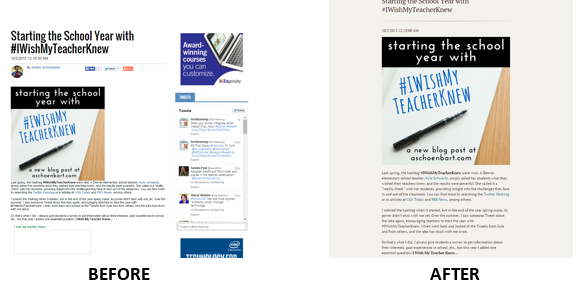


Many of us get distracted when we are online -- so do our students. Using the Clearly extension to help us remove those distractions is a must. Just go to the Web Store and search for Clearly - by evernote.com 

Monday, October 12, 2015

Pic Collage - The Ultimate Photo Collage Creator

Pic Collage was one of the first apps I downloaded on my iPad and I've been using it ever since.

Using the simple layout options, select the best one for your photos,  and then add photos from your device or from the web. You can also add text and stickers, change the background, and create special effects for your photos. 

Your creations can be saved to your device, instagram, twitter, facebook, or tumblr.

This app is an absolute must for students. It can be used in any subject area and can be as detailed as you want it to be. 

Need some ideas? Just click on this Pinterest search to be inspired - Pic Collage App Search

Wednesday, October 7, 2015

The Sky's the Limit with Padlet

I remember back in the day when Padlet was Wall Wisher. That was a while back - I loved Wall Wisher, but it seemed to have a few issues - well NO MORE! Along with the name change, Padlet has gotten it together and is now one of my absolute FAVORITE websites (and apps) for sharing content and ideas. 

So what is Padlet you ask? Padlet is, at the most basic level, an online bulletin board or virtual wall. You and your students can post information for others to view. But really, Padlet is so much more than that. Here are just a few ways teachers and students can use Padlet in the classroom - teachers can post questions that students can answer, students can provide feedback/evaluation of a project, students can upload their work for others to see, teachers can use it as a communication tool for parents, students can write book reviews, teachers can post links to video tutorials or websites to be used in research, and the list could go on and on.


I encourage you to take a look at Padlet.com (and the app). Here's a link to a video explaining how to use Padlet and it also has a few examples - https://youtu.be/8VcSQygAf6E.

Tuesday, October 6, 2015

Removing a Background from a Graphic Using PowerPoint

We've all been there. We find the perfect graphic to use in our presentation or in a publication and it has an awful background around it that ruins everything. Have no fear, there is a way to remove that background. 

I like to use PowerPoint to remove backgrounds - just insert the graphic onto a slide and use the remove background option to get it looking good. 


Here's a quick video to show you how it's done. 

https://youtu.be/YkcSJjNwFL0

Monday, October 5, 2015

Creating Videos with Shadow Puppet Edu

Using Shadow Puppet Edu makes video creation super simple. With only a few clicks, students can create videos to tell a story, share ideas, or show what they know. 

Using images from the iPad or the built in image search including the Library of Congress, NASA, Creating Commons and much more, students can create videos with up to 100 images per video and up to 30 minutes long. They can also add narration, background music and text to each slide. When the video is complete, students can save it to the camera roll and then easily share it through social media, email or copy to Google Drive, Classroom, or OneDrive. Best of all, there are over 30 activity ideas built into the app to help everyone get started.


Check out the Shadow Puppet Edu app in the app store.